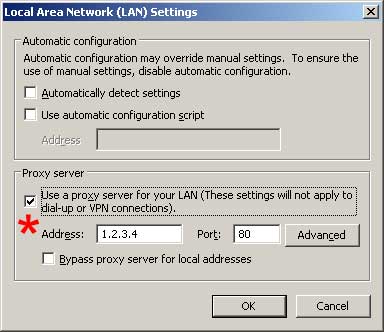
Cloudpath can detect whether or not IE is configured to use a proxy.
Supported settings include:
Unchecked - Default. When unchecked, IE will not use the proxy specified by IP and port. If unchecked, the IP and port do not need to be specified.
Checked - When checked, IE will use the proxy specified by IP and port. If checked, the IP and port of the proxy must also be specified. This information is specified in the format '1.1.1.1:80'.
Cloudpath is able to auto remediate this setting. By default, Windows has this setting unchecked.
Copyright 2006-2017 Ruckus Wireless Inc.
Use of this website signifies your agreement to the Terms & Conditions