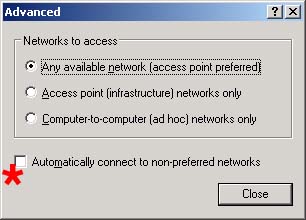
Controls whether or not Windows will automatically connect to networks not in your 'Preferred Networks' list.
Values:
Checked Windows will automatically connect to networks not defined in your 'Preferred Networks' list. Unchecked Windows will only automatically connect to networks defined in your 'Preferred Networks' list.
Default Value:
Unchecked
Recommended Setting:
Unchecked
Cloudpath Help :
Cloudpath is able to detect the state of the 'Automatically connect to non-preferred networks' setting. This setting controls whether or not Windows roams to undefined networks.
Supported settings include:
Disabled - Default. When selected, Windows will only connect automatically to networks for which a profile exists.
Enabled - When selected, Windows will connect automatically to a network regardless of whether or not a profile exists for the SSID.
Cloudpath is able to auto remediate this setting.
Copyright 2006-2017 Ruckus Wireless Inc.
Use of this website signifies your agreement to the Terms & Conditions