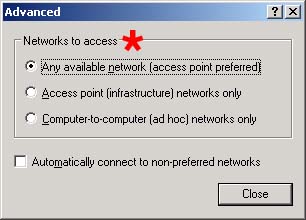
Controls the type of wireless networks that Windows will allow.
Values:
Any available network (access point preferred) Windows will first try to attach to an access point. If unable, it will look for peer-to-peer connections. Access point (infrastructure) networks only. Windows will only allow connections to access points. Peer-to-peer connections will not be allowed. Computer-to-computer (ad-hoc) networks only. Windows will only allow peer-to-peer connections. Windows will not attach to access points.
Default Value:
Any available network (access point preferred)
Recommended Setting:
Access point (infrastructure) networks only is desirable, although it may not be worth changing.
Cloudpath Help :
Cloudpath is able to detect the status of the 'Networks to access' setting. This setting controls the types of networks to which the wireless manager will attach.
Supported settings include:
Access point networks only - Default. When selected, Windows will only connect to access points (infrastructure mode).
Any available network - When selected, Windows will allow both connections to access points as well as ad-hoc connections.
Cloudpath is able to auto remediate this setting.
Copyright 2006-2017 Ruckus Wireless Inc.
Use of this website signifies your agreement to the Terms & Conditions